Why Website Rebranding Is a Strategic Imperative
In today's hyper-connected digital economy, your website is more than a business card — it is your most powerful sales tool, your brand ambassador, and often, the first impression a potential customer will ever have of your company. Yet many businesses continue to operate with outdated, misaligned digital identities that no longer reflect who they are, what they offer, or the audiences they seek to attract.
Website rebranding is the process of fundamentally rethinking and redesigning your digital presence — from the domain name and hosting infrastructure to the visual identity, content strategy, and user experience. It goes far beyond a cosmetic makeover. A strategic rebrand aligns your online presence with your current business goals, target market, and brand values.
According to a study by Nielsen, 59% of consumers prefer to buy from brands that are familiar to them, and brand consistency across all platforms can increase revenue by up to 23% (Lucidpress, 2021). Furthermore, Google's Core Web Vitals have made site performance a direct ranking factor, meaning a technically superior rebrand directly impacts search visibility.
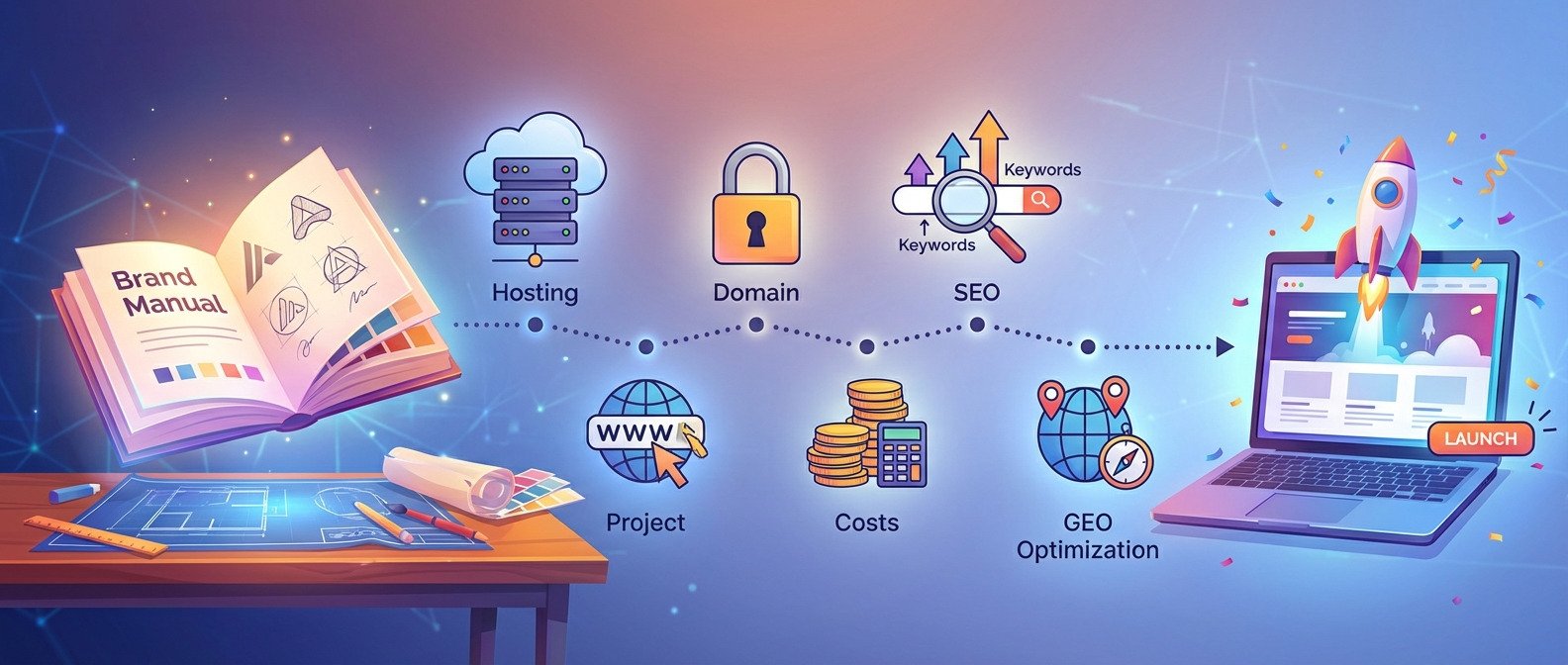
This comprehensive guide — brought to you by IntelliBrandAI.com — walks you through every stage of the rebranding process: from defining your brand identity and building your Brand Manual, to understanding hosting and domain infrastructure, executing a seamless migration, and optimizing for SEO and GEO (Generative Engine Optimization) in the age of AI-powered search.
Section 1: Understanding What Website Rebranding Really Means
1.1 Definition and Scope
Website rebranding encompasses a spectrum of changes. At its simplest, it may involve refreshing a logo and color palette. At its most comprehensive, it involves redefining the company's core messaging, restructuring information architecture, migrating to a new domain, switching hosting providers, rebuilding the site from scratch, and realigning all digital marketing channels.
| Type of Rebrand | Scope | Typical Timeline | Relative Cost |
| Visual Refresh | Logo, colors, fonts, images | 4–8 weeks | $ Low |
| Partial Rebrand | Visual + messaging + UX | 2–4 months | $$ Medium |
| Full Rebrand | Identity + tech + domain + content | 4–9 months | $$$ High |
| Corporate Rebrand | Company-wide incl. offline assets | 6–18 months | $$$$ Enterprise |
1.2 Why Brands Rebrand: The Core Triggers
Understanding why companies rebrand is essential context before embarking on the process. Common triggers include:
- Mergers, acquisitions, or corporate restructuring
- Entering new markets or target demographics
- Outdated visual identity that no longer reflects brand values
- Negative brand perception or reputation recovery
- Competitive differentiation — standing out in a saturated market
- Technological evolution — mobile-first, AI-driven experiences
- SEO and performance issues on the existing platform
- A new product line or service pivot requiring new positioning
Notable examples of successful rebrands include Instagram (from Burbn to Instagram), Dunkin' Donuts (to Dunkin'), and Old Spice — all of which resulted in measurable increases in brand equity, web traffic, and revenue.
Section 2: Before You Rebrand — Build Your Brand Manual

A comprehensive Brand Manual is the foundation of every successful rebrand — it ensures visual and verbal consistency across all platforms.
2.1 What Is a Brand Manual?
A Brand Manual (also called Brand Guidelines or a Brand Style Guide) is a comprehensive document that defines all the visual and verbal elements that constitute your brand identity. It is the single source of truth for how your brand looks, sounds, and communicates — across your website, social media, print materials, advertising, and beyond.
Without a Brand Manual, your rebrand will lack consistency. Different designers, marketers, and content creators will make individual decisions that fragment your identity. A Brand Manual eliminates guesswork and ensures every touchpoint is aligned.
2.2 Brand Manual vs. Brand Guidelines — What's the Difference?
| Aspect | Brand Manual | Brand Guidelines |
| Depth | Comprehensive — 30–100+ pages | Summary — 5–20 pages |
| Purpose | Internal operations & agency briefing | Quick reference for designers/marketers |
| Includes | Full strategy, tone, culture, usage rules | Core visual elements only |
| Audience | Entire organization + external partners | Creative teams |
| Update frequency | Quarterly or upon major brand shifts | As needed |
2.3 What a Complete Brand Manual Contains
- Brand Strategy Foundation — Mission, vision, values, brand promise, unique value proposition (UVP), positioning statement
- Target Audience Personas — Demographics, psychographics, pain points, aspirations
- Brand Personality & Tone of Voice — Adjectives, communication style, dos and don'ts
- Logo System — Primary logo, secondary logos, icon marks, minimum sizes, clear space rules, forbidden uses
- Color Palette — Primary and secondary colors with HEX, RGB, CMYK, and Pantone codes
- Typography System — Heading fonts, body fonts, fallback web fonts, size hierarchy, line spacing
- Imagery Style — Photography style, illustration guidelines, iconography, image filters
- UI/UX Components — Button styles, form elements, navigation patterns (for digital brands)
- Social Media Templates — Profile images, cover photos, post templates
- Email Signature & Business Document Templates
- Brand Voice Messaging Templates — Taglines, elevator pitches, social bio formulas
| 🔑 IntelliBrandAI Pro Tip |
| ▸ Invest in your Brand Manual BEFORE any design work begins. Every design decision should flow from your strategy. |
| ▸ Use tools like Figma, Adobe InDesign, or Canva for Brand Kit to create a professional Brand Manual. |
| ▸ Share your Brand Manual with every vendor, designer, and developer involved in the rebrand. |
| ▸ Store it in a centralized, version-controlled location (Google Drive, Notion, or Confluence). |
Section 3: Understanding Domains — What They Are and How They Work
3.1 What Is a Domain Name?
A domain name is the human-readable address that users type into their browser to access your website — for example, intellibrandai.com. Behind this name lies a complex system called the Domain Name System (DNS), which translates the domain into an IP address that computers can understand.
The structure of a domain name has three components:
- Subdomain (optional): www, blog, shop — e.g., blog.intellibrandai.com
- Second-Level Domain (SLD): The brand name — intellibrandai
- Top-Level Domain (TLD): The extension — .com, .net, .org, .io, .ai
3.2 How DNS Works — A Technical Overview
When a user types your domain into their browser, the following occurs in milliseconds:
- The browser checks its local cache for the IP address
- If not found, a DNS query is sent to the Recursive Resolver (usually provided by the ISP or Google DNS)
- The resolver contacts the Root Name Servers to find the authoritative name server for your TLD
- The TLD Name Server points to your domain registrar's authoritative server
- The authoritative server returns the correct IP address
- The browser connects to the web server at that IP and loads your site
3.3 Domain Considerations During a Rebrand
Choosing a new domain during a rebrand is a critical decision with long-term SEO and brand implications. Consider the following:
| Factor | Recommendation | SEO Impact |
| TLD Selection | Prefer .com; .ai works for tech/AI brands | High — .com has stronger trust signals |
| Brandability | Short, memorable, easy to spell | Medium — affects CTR |
| Keywords in domain | Exact-match domains are less powerful in 2025; brand > keywords | Low-Medium |
| Domain age | If possible, keep the old domain and redirect | High — preserves link equity |
| 301 Redirects | Set up ALL old URLs to redirect to new ones | Critical — prevents traffic loss |
| SSL Certificate | Always use HTTPS on new domain | High — ranking signal since 2014 |
3.4 Domain Registrars — Where to Register Your Domain
A domain registrar is an accredited organization authorized to register domain names. Popular registrars include:
- Namecheap — Best value for small to medium businesses
- GoDaddy — Largest registrar with robust management tools
- Google Domains (now Squarespace Domains) — Clean UI, easy Google integration
- Cloudflare Registrar — At-cost pricing with advanced security
- Hover — Privacy-focused with clean interface
Annual domain registration costs range from $10–$20/year for common TLDs, up to $100+/year for premium extensions like .ai or .io.
Section 4: Web Hosting — The Foundation of Your Digital Presence
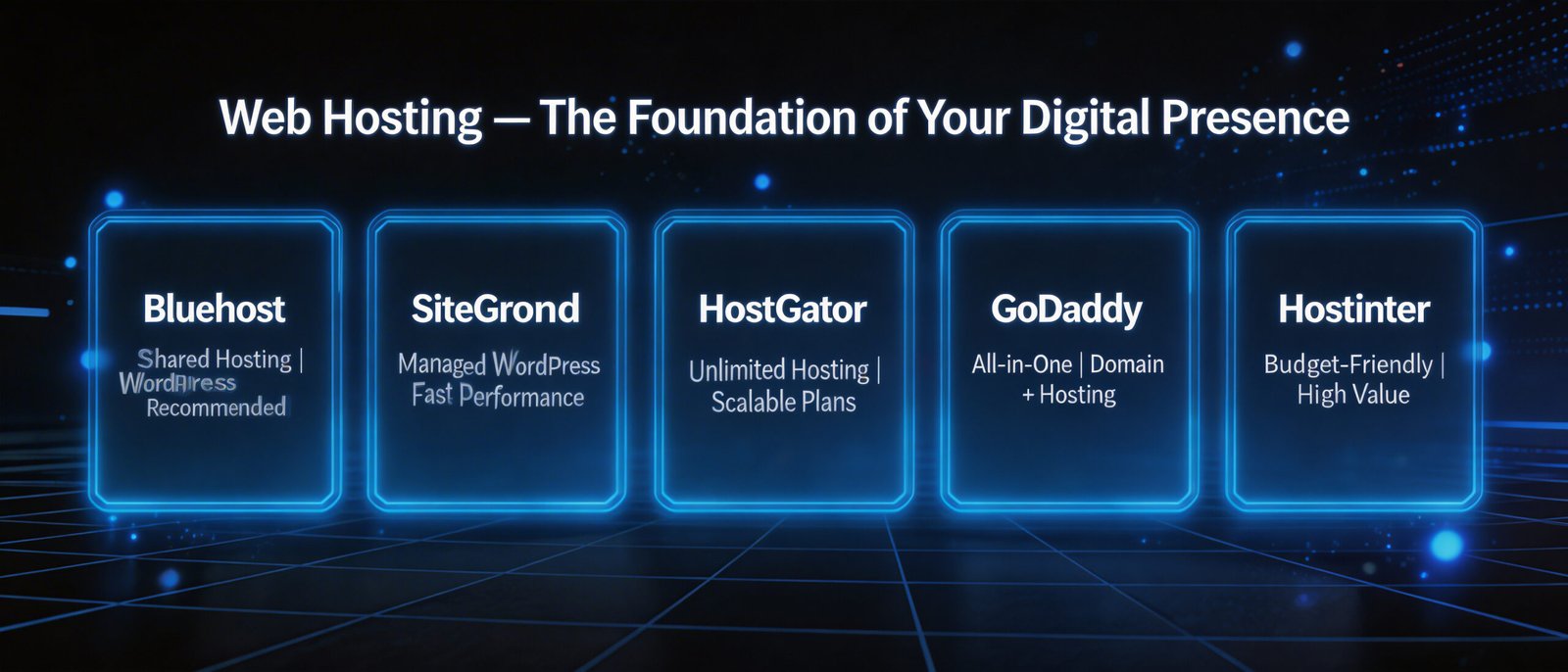
Choosing the right hosting provider is a critical technical and strategic decision that directly impacts site performance, security, and SEO rankings.
4.1 What Is Web Hosting?
Web hosting is a service that stores your website's files — HTML, CSS, JavaScript, images, databases — on servers connected to the internet 24/7, making your site accessible to users around the world. Without hosting, your website simply does not exist online.
When a user visits your domain, their browser sends a request to the hosting server, which delivers the website files to their screen. The speed, reliability, and security of this process depend entirely on the quality of your hosting infrastructure.
4.2 Types of Web Hosting Compared
| Type | Description | Best For | Monthly Cost (USD) | Performance |
| Shared Hosting | Multiple sites on one server | Blogs, small sites | $3–$10 | ⭐⭐ |
| VPS Hosting | Dedicated virtual server partition | Growing SMBs | $20–$80 | ⭐⭐⭐ |
| Dedicated Server | Entire physical server for one client | High-traffic sites | $80–$500+ | ⭐⭐⭐⭐ |
| Cloud Hosting | Distributed server network (AWS, GCP, Azure) | Scalable businesses | $15–$500+ | ⭐⭐⭐⭐⭐ |
| Managed WordPress | Optimized WP environment | WordPress sites | $25–$150 | ⭐⭐⭐⭐ |
| Headless/Jamstack | Decoupled CMS + CDN delivery | Modern dev teams | $0–$100+ | ⭐⭐⭐⭐⭐ |
4.3 Key Hosting Metrics That Affect SEO
- Uptime: Aim for 99.9% uptime minimum — downtime loses rankings
- Time to First Byte (TTFB): Should be under 200ms for optimal Core Web Vitals
- Server Location: Hosting closer to your target audience reduces latency (consider CDN)
- SSL/TLS: HTTPS is mandatory — both for security and Google rankings
- HTTP/2 or HTTP/3 Support: Enables multiplexing for faster page loads
- Automatic Backups: Critical for rebrand migrations to prevent data loss
4.4 Top Hosting Providers for 2025
| Provider | Best For | Notable Feature | Starting Price |
| Kinsta | WordPress excellence | Google Cloud C2 instances | $35/mo |
| WP Engine | Managed WordPress | EverCache technology | $25/mo |
| Cloudways | Flexible cloud hosting | Choose AWS/GCP/DO | $14/mo |
| SiteGround | SMB all-around | Ultrafast PHP | $6.99/mo |
| Vercel | Next.js / JAMstack | Edge network deployment | Free–$20/mo |
| AWS / GCP / Azure | Enterprise scalability | Global infrastructure | Variable |
Section 5: Before and After — What a Rebrand Actually Transforms
5.1 The “Before” State: Signs Your Brand Needs a Rebrand
Before initiating a rebrand, conduct an honest audit of your current digital state. Warning signs that it's time to rebrand include:
| 🚨 Signs You Need a Rebrand |
| ▸ Your website design looks outdated or amateurish compared to competitors |
| ▸ Your bounce rate is above 70% and average session duration is below 90 seconds |
| ▸ Your brand visual identity is inconsistent across web, social media, and print |
| ▸ Your target audience has shifted and your brand no longer speaks to them |
| ▸ You are expanding into new markets where your current brand doesn't resonate |
| ▸ Your site scores below 50 on Google PageSpeed Insights |
| ▸ You receive negative feedback about your brand or website appearance |
| ▸ Your brand was built DIY and lacks professional foundation |
| ▸ Your messaging no longer accurately reflects your products or services |
5.2 The “After” State: What a Successful Rebrand Achieves
When executed strategically, a website rebrand delivers measurable improvements across brand perception, user experience, and business performance:
| Metric | Typical Before Rebrand | Typical After Rebrand | Improvement |
| Bounce Rate | 65–80% | 35–50% | ↓ 25–45% |
| Page Load Time | 5–8 seconds | 1.5–3 seconds | ↓ 60–80% |
| Mobile Usability Score | 45–65/100 | 85–100/100 | ↑ 35–55 pts |
| Organic Search Traffic | Baseline | +40–120% after 6 months | ↑ Significant |
| Lead Conversion Rate | 1–2% | 3–6% | ↑ 2–4x |
| Brand Recall | Low–Medium | High (after consistent exposure) | ↑ Strong |
| Domain Authority | 15–30 | 35–60+ (within 18 months) | ↑ Gradual |
Section 6: The Complete Website Rebranding Process — Step by Step
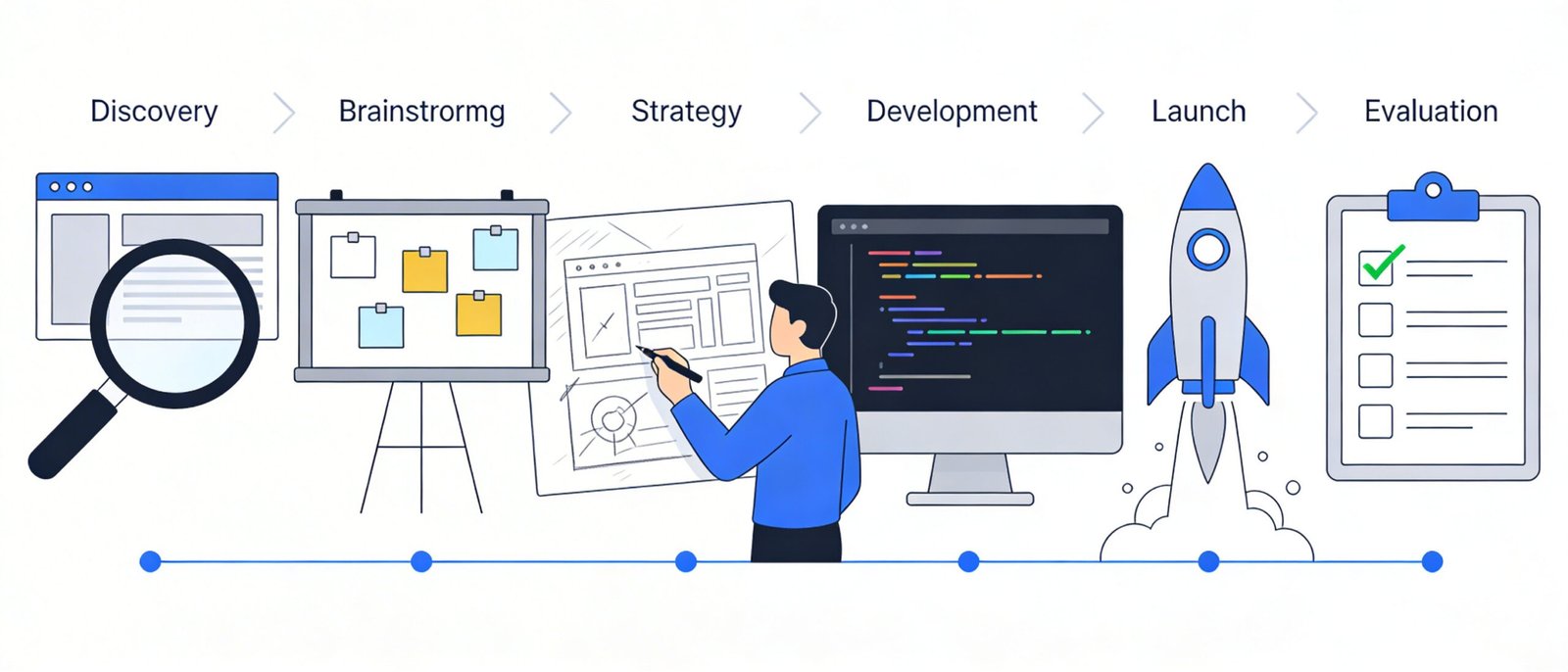
A successful rebrand follows a structured process with clearly defined phases, milestones, and stakeholder reviews.
Phase 1: Discovery & Strategy (Weeks 1–3)
- Brand Audit — Inventory existing assets: logo files, color codes, fonts, website analytics, social profiles
- Competitive Analysis — Analyze top 5–10 competitors' digital presence, positioning, and visual identity
- Audience Research — Conduct surveys, interviews, or use analytics tools to understand your target persona
- Define Brand Positioning — Articulate your UVP, brand promise, and competitive differentiation
- Set KPIs — Define measurable success metrics: traffic, leads, bounce rate, brand searches, DA
Phase 2: Brand Identity Development (Weeks 3–7)
- Logo Design — Work with a professional designer to create/evolve your logo system
- Color Palette — Select a primary palette (2–3 colors) and secondary palette (2–4 colors)
- Typography — Choose 1–2 web-safe or Google Fonts that reflect brand personality
- Brand Voice Documentation — Write out brand tone, messaging pillars, and sample copy
- Create Brand Manual — Compile all elements into a comprehensive guide (see Section 2)
Phase 3: Domain & Hosting Setup (Weeks 6–8)
- Select and register new domain (if changing) — check availability, trademark conflicts
- Choose hosting provider based on projected traffic, tech stack, and budget
- Set up staging environment — NEVER develop directly on production
- Configure SSL/TLS certificate — use Let's Encrypt (free) or a paid certificate
- Set up CDN (Cloudflare, Fastly, or hosting-integrated CDN) for global performance
Phase 4: Website Design & Development (Weeks 8–16)
- Wireframing — Map out new site architecture and page structures
- UI Design — Create high-fidelity mockups in Figma, Adobe XD, or Sketch
- Development — Build on staging environment using your chosen CMS or framework
- Content Migration — Rewrite or adapt all copy to reflect new brand voice
- SEO Foundation — Implement meta titles, descriptions, schema markup, canonical tags, sitemap
- Performance Optimization — Compress images, enable lazy loading, optimize code
- Mobile Responsiveness — Test across devices and screen sizes
- Accessibility Compliance — Ensure WCAG 2.1 AA compliance for inclusivity and legal protection
Phase 5: Pre-Launch Preparation (Weeks 15–17)
- 301 Redirect Map — Every old URL must redirect to the new equivalent URL
- Google Search Console Setup — Verify new domain, submit XML sitemap
- Analytics Configuration — Set up GA4, conversion tracking, heatmaps (Hotjar)
- Cross-browser Testing — Chrome, Firefox, Safari, Edge; desktop and mobile
- Load Testing — Simulate traffic spikes using tools like k6 or GTmetrix
- Stakeholder Review & Sign-off
Phase 6: Launch & Post-Launch (Week 17+)
- DNS Migration — Point domain to new hosting server; allow 24–48 hours for propagation
- Monitor 301 Redirects — Use Screaming Frog to crawl and validate all redirects
- Submit New Sitemap — In Google Search Console and Bing Webmaster Tools
- Social Media Updates — Update all profile images, bios, links, and pinned posts
- PR & Announcement — Publish rebrand announcement on blog, email list, social media, and press releases
- Monitor Rankings — Track keyword positions daily for first 4–6 weeks post-launch
- Fix Issues Fast — Address any ranking drops, broken links, or UX issues within 48 hours
Section 7: Website Rebranding Costs — Complete Breakdown
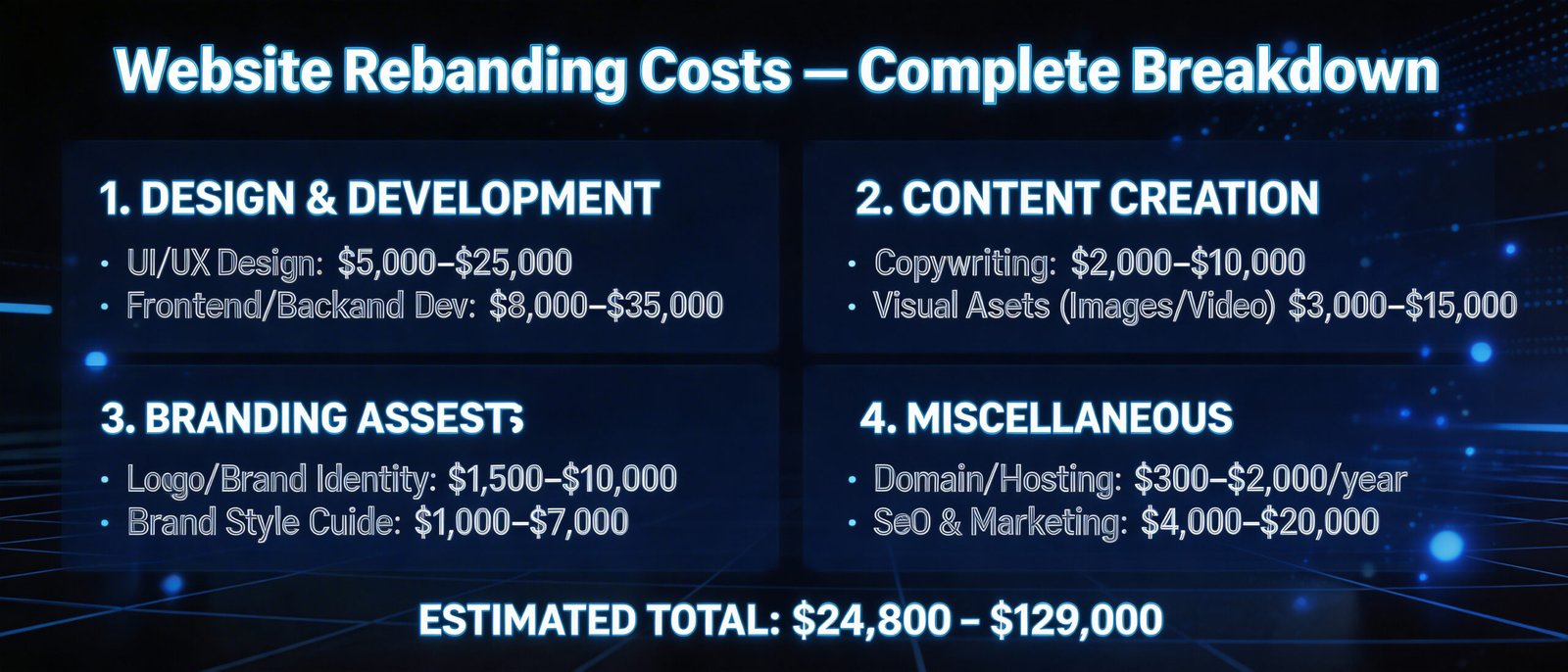
Budgeting accurately for a website rebrand prevents mid-project scope creep and ensures all critical elements are properly funded.
7.1 Cost Components
| Cost Component | DIY / Budget | Mid-Market | Premium / Agency |
| Brand Strategy & Positioning | $0 (self-led) | $2,000–$8,000 | $15,000–$50,000+ |
| Logo & Visual Identity Design | $50–$500 (Canva) | $1,500–$5,000 | $10,000–$30,000 |
| Brand Manual Creation | $0 (template) | $500–$2,000 | $3,000–$10,000 |
| Domain Registration (annual) | $10–$20/yr | $10–$100/yr | $100–$500/yr (.ai, .io) |
| Web Hosting (annual) | $50–$100/yr | $200–$1,500/yr | $2,000–$20,000/yr |
| Website Design (UI/UX) | $500–$2,000 | $5,000–$20,000 | $30,000–$100,000+ |
| Website Development | $500–$2,000 | $5,000–$25,000 | $25,000–$150,000+ |
| Content Writing & Copywriting | $0 (self-written) | $1,000–$5,000 | $5,000–$30,000 |
| SEO Setup & Migration | $0 (self-managed) | $1,000–$5,000 | $5,000–$20,000 |
| Photography / Video | $0 (stock) | $500–$3,000 | $5,000–$50,000 |
| Social Media Kit Updates | $0 (self-done) | $200–$1,000 | $1,000–$5,000 |
| Project Management | $0 | $500–$2,000 | $2,000–$10,000 |
| TOTAL ESTIMATED RANGE | $1,000–$5,000 | $16,000–$72,000 | $100,000–$500,000+ |
| 💡 Cost-Saving Strategies |
| ▸ Use AI-powered design tools (Midjourney, Adobe Firefly) for initial concept exploration before hiring designers |
| ▸ Leverage IntelliBrandAI's brand automation tools to accelerate Brand Manual creation |
| ▸ Use open-source CMS platforms (WordPress, Ghost) with premium themes to reduce development costs |
| ▸ Batch content creation with AI writing assistants to reduce copywriting fees |
| ▸ Use Cloudflare's free CDN and security layer to avoid expensive dedicated security solutions |
| ▸ Phase the rebrand — prioritize revenue-generating pages first, then migrate secondary content |
Section 8: SEO Strategy for Website Rebranding
8.1 Why Rebranding Is a High-Risk SEO Event
Website rebranding — especially when it involves a domain migration — is one of the highest-risk events for organic search performance. Without meticulous SEO planning, a rebrand can result in the loss of years of accumulated ranking authority, backlink equity, and indexed content. Google's John Mueller has repeatedly emphasized that domain migrations should be treated with extreme care.
Key SEO risk areas during a rebrand include: link equity loss from incorrect 301 redirects, duplicate content from incomplete canonicalization, crawl budget waste, temporary ranking volatility (expected for 3–6 months), and loss of brand search impressions.
8.2 On-Page SEO Checklist for Rebrands
- Update all meta titles and descriptions to reflect new brand name and keywords
- Implement hreflang tags if targeting multiple languages or regions
- Ensure every page has a unique, keyword-optimized H1 tag
- Update internal linking structure to reflect new URL architecture
- Resubmit XML sitemaps to Google Search Console and Bing Webmaster Tools
- Set canonical tags on all pages to prevent duplicate content issues
- Implement structured data (Schema.org) for Organization, LocalBusiness, Article, etc.
- Optimize Core Web Vitals: LCP < 2.5s, FID < 100ms, CLS < 0.1
- Update Open Graph and Twitter Card meta tags for social sharing
8.3 Off-Page SEO: Protecting and Building Backlink Equity
Backlinks are the currency of SEO. A rebrand is an opportunity to audit, clean, and strengthen your backlink profile. Steps to protect link equity:
- Export all backlinks using Ahrefs, Semrush, or Moz before migration
- Identify and disavow toxic backlinks using Google's Disavow Tool
- Ensure all 301 redirects pass link equity correctly (avoid redirect chains)
- Contact high-authority sites linking to your old domain and request link updates
- Launch a digital PR campaign to earn new high-authority backlinks to the rebranded site
8.4 High-Authority Backlink Sources for Rebrands
As part of your rebrand launch strategy, target backlinks from these authoritative domains:
| Source Type | Examples | Domain Authority | How to Earn |
| Industry Publications | Forbes, Entrepreneur, Inc. | DA 90–95 | Press releases, contributed articles |
| Business Directories | Clutch, G2, Capterra | DA 70–90 | Free/paid listing profiles |
| News Wire Services | PR Newswire, Business Wire | DA 80–95 | Paid press release distribution |
| Podcast Features | Industry-specific podcasts | DA 40–80 | Pitching as a guest expert |
| Resource Pages | University .edu sites, NGOs | DA 60–90 | Outreach with valuable content |
| Partner Websites | Existing business partners | Variable | Mutual link exchange agreement |
| HARO / Connectively | Journalist sourcing platforms | DA 70–95 | Respond to journalist queries |
Section 9: GEO — Generative Engine Optimization for the AI Era
9.1 What Is GEO and Why It Matters in 2025
Generative Engine Optimization (GEO) is an emerging discipline focused on optimizing content so that AI-powered search engines — including Google's AI Overviews (formerly SGE), Perplexity AI, ChatGPT, and Bing Copilot — cite, reference, and recommend your brand's content in their AI-generated responses.
In 2025, an estimated 40–60% of informational search queries on Google now result in an AI Overview that appears before traditional organic results. This means that even if your site ranks #1, many users may never click through if the AI Overview answers their question directly. GEO bridges this gap by ensuring your content is the source AI models cite.
A study by Columbia Business School (2024) found that GEO optimization tactics can increase content visibility in AI-generated responses by 40–115%. For rebranding companies, this represents a massive opportunity to establish authority in their new brand territory from day one.
9.2 GEO Optimization Tactics for Your Rebranded Site
- Authoritative Long-Form Content: Publish comprehensive, research-backed guides (2,000–5,000+ words) that AI models are more likely to cite
- Cite Credible Sources: Link to peer-reviewed research, government data, and industry studies to signal trustworthiness
- Use Structured Data: Implement Article, Organization, FAQ, and HowTo schema to help AI parse your content
- Entity Optimization: Establish your brand as a recognized entity in Google's Knowledge Graph
- Answer Questions Directly: AI models prefer content with clear, direct answers to common questions — use question-based H2/H3 headings
- Build E-E-A-T Signals: Experience, Expertise, Authoritativeness, Trustworthiness — the four pillars Google uses to evaluate AI-citable content
- Optimize for Voice Search: Conversational queries are increasingly AI-processed — structure content for natural language
- Claim AI Profiles: Register your brand on ChatGPT's ‘Plugins' directory, Perplexity's business profiles, and Bing Copilot's partner program
9.3 Local GEO Optimization (Geographic Targeting)
If your rebrand targets specific geographic markets, implement these GEO-specific tactics:
- Create localized landing pages for each target city, region, or country
- Implement hreflang tags for multilingual/multinational sites
- Optimize Google Business Profile with new brand name, logo, and description
- Build citations on local directories: Yelp, Yellow Pages, Apple Maps, Google Maps
- Create location-specific content that references local landmarks, events, and culture
- Use local structured data (LocalBusiness, GeoCoordinates) to help AI understand your geographic relevance
Section 10: Full Rebranding Timeline & Project Checklist
| Week | Phase | Key Deliverables | Owner |
| 1–2 | Discovery | Brand audit report, competitor analysis | Strategy Lead |
| 2–3 | Strategy | Brand positioning doc, audience personas, KPIs | Brand Strategist |
| 3–5 | Identity Dev | Logo concepts, color palette, typography selection | Designer |
| 5–7 | Brand Manual | Complete Brand Manual (PDF + editable files) | Designer + Strategist |
| 6–8 | Tech Setup | Domain registered, hosting configured, staging live | Developer |
| 8–12 | Design | Wireframes, UI mockups, design system | UI/UX Designer |
| 10–16 | Development | Site built on staging, CMS configured, SEO foundation | Developer |
| 14–16 | Content | All copy written, images selected/created, optimized | Content Team |
| 15–17 | Pre-Launch | QA testing, 301 map, analytics setup, stakeholder sign-off | PM + Dev |
| 17 | Launch | DNS migration, sitemap submission, social updates | All Hands |
| 17–22 | Post-Launch | Monitoring, fixes, PR campaign, backlink outreach | SEO + Marketing |
| Ongoing | Optimization | A/B testing, content publishing, GEO strategy | Marketing |
Section 11: References and High-Authority Sources
The following high-authority sources were referenced in this article and serve as recommended further reading for your rebranding research:
- Google Search Central — Core Web Vitals Documentation: https://developers.google.com/search/docs/appearance/core-web-vitals
- Ahrefs Blog — Complete Guide to Domain Migration SEO: https://ahrefs.com/blog/seo-migration/
- Semrush — Website Rebranding: The Complete SEO Guide: https://www.semrush.com/blog/website-rebranding/
- Nielsen — Brand Familiarity and Consumer Trust Study (2022): https://www.nielsen.com/insights/
- Lucidpress — The Impact of Brand Consistency Report (2021): https://www.lucidpress.com/pages/resources/report/the-impact-of-brand-consistency
- Columbia Business School — Generative Engine Optimization Study (2024): https://arxiv.org/abs/2311.09735
- Moz — The Beginner's Guide to SEO: https://moz.com/beginners-guide-to-seo
- W3C — Web Content Accessibility Guidelines (WCAG) 2.1: https://www.w3.org/TR/WCAG21/
- ICANN — Domain Name Registration Resources: https://www.icann.org/resources/pages/registrars
- Google Business Profile Help — Manage Your Profile: https://support.google.com/business/
- Cloudflare Blog — Web Performance and DNS Best Practices: https://blog.cloudflare.com/
- HubSpot — The Complete Guide to Brand Identity: https://blog.hubspot.com/marketing/brand-identity
Conclusion: Your Rebrand Is a Strategic Investment, Not a Cost
Website rebranding is one of the highest-leverage investments a business can make. When executed with strategic clarity — grounded in a comprehensive Brand Manual, supported by solid hosting infrastructure, optimized for both traditional SEO and emerging GEO signals, and communicated with a coherent brand voice — a rebrand does not just change how your business looks. It changes how your business grows.
The brands that thrive in 2025 and beyond will be those that treat their digital presence as a living, evolving asset — not a static website built years ago. They will invest in brand consistency, technical performance, and content authority. They will embrace AI-driven search optimization. And they will never stop iterating.
At IntelliBrandAI, we specialize in exactly this kind of strategic, data-driven brand transformation. Whether you are at the beginning of your rebrand journey or mid-process and in need of expert guidance, our team is here to help you build a digital presence that does not just look great — it performs.
Ready to rebrand? Visit intellibrandai.com or contact our brand strategy team today.