For the modern work-from-home businesswoman, the challenge isn't just getting work done; it’s managing the exhausting context-switching between marketing, operations, and client service. In today's digital landscape, mastering SEO and GEO (Generative Engine Optimization) is crucial for visibility, yet traditional AI often feels like a “one-off” conversation that requires you to repeat instructions constantly.
Claude Skills change that dynamic entirely. Rather than just a chat feature, think of a Skill as a “digital employee” that learns your specific business procedures once and for all. By encoding your expertise into a Skill, you achieve “10x efficiency,” ensuring your SEO and GEO strategies are applied consistently without manual oversight. We have seen this technology reduce 10 weeks of clinical documentation work down to just 10 minutes in enterprise settings and that same power is now available for your home office.
Claude Skills change that dynamic entirely. Rather than just a chat feature, think of a Skill as a “digital employee” that learns your specific business procedures once and for all. By encoding your expertise into a Skill, you achieve “10x efficiency,” ensuring your SEO and GEO strategies are applied consistently without manual oversight. We have seen this technology reduce 10 weeks of clinical documentation work down to just 10 minutes in enterprise settings—and that same power is now available for your home office.

Female entrepreneur using Claude AI Skills for productivity and SEO optimization in a home office.
1. Basic Concepts: Skills vs. Projects vs. Artifacts
To build an efficient AI-powered business, you must understand the “Core Three” features of the Claude ecosystem. Each serves a distinct purpose in your workflow.
| Feature | Purpose | Key Function |
|---|---|---|
| Claude Projects | Context | A persistent workspace (200K context) that holds specific knowledge, such as client files or research. |
| Claude Skills | Procedure | Reusable instructions that tell Claude how to do a task, like applying your brand voice. |
| Claude Artifacts | Output | Visual tools or mini-apps that Claude builds for you, like diagrams or live-preview websites. |
One of the most powerful technical advantages is Progressive Disclosure. Skills “sleep” in the background as lightweight metadata. Claude only “scans” the metadata and consumes full memory when triggered. Furthermore, while standard AI is “probabilistic,” Skills allow for deterministic output. By using built-in Python or Node.js environments, a Skill ensures your brand colors, invoice math, or data formatting remain 100% consistent every single time.
2. Getting Your Workspace Ready (Pre-Flight Checklist)
Before you can build or use custom Skills, you must enable the correct environment settings. Skills are available on all plans, but they require the “engine” to be running.
- Navigate to Settings.
- Select Capabilities.
- Locate the Code Execution toggle and switch it ON. This allows Claude to use Python (including libraries like pandas) to run your Skills.
- Locate the Skills toggle and switch it ON.
How to enable Claude Skills and Code Execution in settings for business automation.
3. Step-by-Step: Creating Your First Skill (The “Skill-Creator” Method)
You don't need to be a tech expert to build a Skill. The easiest entry point is using Claude’s own “skill-creator”—a specialized meta-skill that essentially “interviews” you to write the underlying code.
- Activate the skill-creator: In your Skills settings, ensure the pre-defined “skill-creator” is toggled on.
- Open the Interview: Start a new chat and ask Claude to use the skill-creator to build a new Skill.
- The Design Phase: Describe your business task in detail. Claude will ask clarifying questions about your preferred tone and rules.
- Download the ZIP: Claude will generate the necessary files. Download the resulting ZIP file.
- The ZIP Rule: Before uploading, ensure the ZIP root contains a folder named after the skill (e.g.,
my-skill/Skill.md). - Upload to Settings: Go back to Settings > Capabilities > Skills, click Upload Skill, and select your ZIP file.
4. Industry Spotlight: Real Estate Coach
For a female Real Estate Coach, maintaining a specific “persuasive property description” framework is vital for consistency. By building a “Listing Architect Skill,” you can turn a messy 30-minute drafting process into a 30-second automated one.
How it works: This Skill stores unique branding rules and copywriting formulas. When you paste raw property data, the Skill triggers automatically. Using the deterministic power of Python, it generates a perfectly formatted property listing, a social media teaser, and an “agent coaching tip sheet.” It moves you from “content creator” to “strategic reviewer” instantly.
5. Industry Spotlight: Financial Administrator
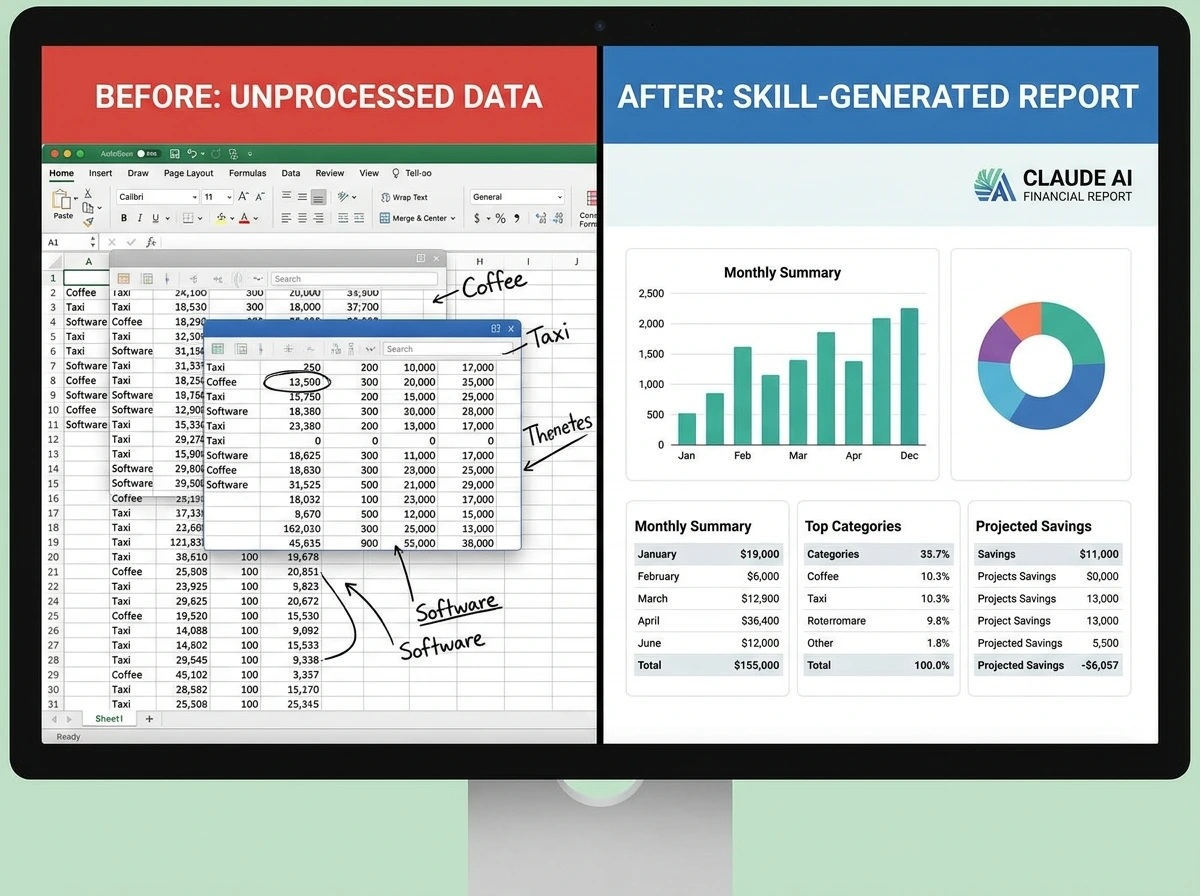
Precision is non-negotiable in finance. A solo administrator can build an “Expense & Compliance Auditor Skill” to act as a first-line reviewer, reducing triage time from 20 minutes down to just 3 minutes per report.
How it works: This Skill is loaded with specific tax categories and “red flag” rules. When you paste an expense export, the Skill automatically flags policy violations and categorizes every cost. It can even use the Model Context Protocol (MCP) to eventually pull data directly from your business tools.
(Image 3 Placeholder)
Image Suggestion: A split-screen graphic. On the left, a chaotic spreadsheet of expenses. On the right, a clean, organized financial report generated by the Skill. Alt Text: Before and after comparison of financial data processed by Claude AI Skills.
6. Pro-Tips for Success and Common Pitfalls
To get the most ROI from your Skills, follow these expert best practices:
- Do: Use diverse activation keywords in your description. For a branding skill, include words like “style,” “visual identity,” and “on-brand.”
- Don't: Make Skills too broad. Avoid a general “Marketing Skill.” Instead, build a “Social Media Skill” and an “Email Newsletter Skill.” Narrower skills are more accurate.
- Do: Test and iterate. If Claude isn't triggering your Skill, ask the “Skill-Creator” to refine the description.
7. Conclusion: Start Small, Scale Fast
Building a library of Claude Skills is the fastest way to turn your “best way of working” into a scalable digital asset. By capturing your procedures today, you ensure that as your home business grows, your AI assistant maintains your standards without constant supervision.
Your challenge this week: Pick one repetitive task—perhaps drafting client emails or formatting weekly reports—and turn it into your first Skill.
Build with total peace of mind: Anthropic maintains strict data privacy. Your business data and custom Skills are not used to train their base models. Your proprietary workflows stay strictly yours.
📥 Download the Presentation & Resources
Ready to take control of your workflow? Download the accompanying slide deck and cheat sheet to start building your Claude Skills today.
( Link this button to your hosted PDF/ZIP file)
References and High Authority Links
- Anthropic Official Documentation: Introduction to Claude Skills. The primary source for technical definitions and capabilities. Read on Anthropic
- Search Engine Land: Understanding GEO (Generative Engine Optimization). A deep dive into how AI is changing search visibility. Read the GEO Guide
- Harvard Business Review: How AI Can Help Women Entrepreneurs Scale. Insights on reducing the workload gap. Read on HBR
- Forbes: The Rise of the Female Founder in the AI Era. Context on why automation tools are vital for women in business. Read on Forbes
WordPress Tags (Directed towards Women/Business)
Women Entrepreneurs, Home Business Tips, Mompreneur Resources, AI for Business, Claude AI Skills, Productivity for Women, SEO for Small Business, GEO Strategy, Work From Home Automation.